Wednesday, 7 August 2013

Cool looking recent post widget for blogger

If you are looking to increase your blog pageviews it is a good idea to add recent posts widget to your blog. This will help you to increase you blog pageviews. because recent posts widget will attract your visitor to stay in your blog and also it will attract your visitors to several posts by this way your traffic wil increase.
Adding a Recent post widget to blogger blog is not a big task. Let me help you to do it.

Step 1

Go to Blogger >> Layout >> Add a widget >> HTML /Javascript

Step 2 

Paste the following code


<style type='text/css'>
#recent-posts img{float:left;margin-right:10px;border:1px solid #999;background:#FFF;width:36px;height:36px;padding:3px}
</style>
<div id='recent-posts'>
<script type='text/javaScript'>
var rcp_numposts=5;
var rcp_snippet_length=150;
var rcp_info='yes';
var rcp_comment='Comments';
var rcp_disable='Turn off comments';
function recent_posts(json){var dw='';a=location.href;y=a.indexOf('?m=0');dw+='<ul>';for(var i=0;i<rcp_numposts;i++){var entry=json.feed.entry[i];var rcp_posttitle=entry.title.$t;if('content'in entry){var rcp_get_snippet=entry.content.$t}else{if('summary'in entry){var rcp_get_snippet=entry.summary.$t}else{var rcp_get_snippet="";}};rcp_get_snippet=rcp_get_snippet.replace(/<[^>]*>/g,"");if(rcp_get_snippet.length<rcp_snippet_length){var rcp_snippet=rcp_get_snippet}else{rcp_get_snippet=rcp_get_snippet.substring(0,rcp_snippet_length);var space=rcp_get_snippet.lastIndexOf(" ");rcp_snippet=rcp_get_snippet.substring(0,space)+"&#133;";};for(var j=0;j<entry.link.length;j++){if('thr$total'in entry){var rcp_commentsNum=entry.thr$total.$t+' '+rcp_comment}else{rcp_commentsNum=rcp_disable};if(entry.link[j].rel=='alternate'){var rcp_posturl=entry.link[j].href;if(y!=-1){rcp_posturl=rcp_posturl+'?m=0'}var rcp_postdate=entry.published.$t;if('media$thumbnail'in entry){var rcp_thumb=entry.media$thumbnail.url}else{rcp_thumb="http://1.bp.blogspot.com/-F9gb64Mlbq0/UOc8eRKL3sI/AAAAAAAACms/DEXj7UWLbkg/s000/no-image.png"};}};dw+='<li>';dw+='<img alt="'+rcp_posttitle+'" src="'+rcp_thumb+'"/>';dw+='<div><a href="'+rcp_posturl+'" rel="nofollow" title="'+rcp_snippet+'">'+rcp_posttitle+'</a></div>';if(rcp_info=='yes'){dw+='<span>'+rcp_postdate.substring(8,10)+'/'+rcp_postdate.substring(5,7)+'/'+rcp_postdate.substring(0,4)+' - '+rcp_commentsNum+'</span>';};dw+='<div style="clear:both"></div></li>';};dw+='</ul>';document.getElementById('recent-posts').innerHTML=dw;};document.write('<script type=\"text/javascript\" src=\"/feeds/posts/default?alt=json-in-script&max-results='+rcp_numposts+'&callback=recent_posts\"><\/script>');
</script>
</div>

That's all recent post widget is now added to your blogger blog. 
[Continue Reading]

Tuesday, 23 July 2013

How to double your YouTube Earnings

Are you looking for any ways to build up or double or boost your YouTube earnings. Then I have a great and working suggestion for you. For boosting your YouTube earnings you can enable pre roll ads, mid roll ads and post roll ads enabling this three ads will help you to double your YouTube earning this ad type that is pre roll ads, mid roll ads and post roll ads are only available for videos longer than ten minute.

How to enable

1. Go to Monetization 

2. There you can see check boxes for pre roll ads, mid roll ads and post roll ads (only for videos longer than 10 minutes)

3.Check all three boxes

pre roll ads, mid roll ads and post roll ads, YouTube monetization, boost YouTube earnings


That's all go now to your YouTube channel enable  pre roll ads, mid roll ads and post roll ads and earn more. also leave your thoughts in the comment section below. Thank you

[Continue Reading]

Monday, 22 July 2013

How to fix-Blogger showing only one post one Homepage

Are you facing this problem, does your blogger homepage is only showing one post. I can help you to fix it. You just need to do is insert a jumb break on your blogger post which is either large or containing big tables

blogger tips,blogger showing only one post one homepage

you can add jumb break to your post very easily you just need to click on jumb break icon while pacing your mouse cursor where you need to add a jumb break.Then you are done .Now your homepage will show all posts.

[Continue Reading]

Wednesday, 17 July 2013

Google Adsense Accept .tk domain

Hi friends, do you have a doubt that 'do adsense accept .tk domains'. The answer is yes, Adsense accept .tk domains if you have good quality content. Somany other websites tell that adsense need a top level domain, good traffic and good design to get approved actually this are not criteria adsense accept your website or blog by looking your content. They look they are quality content or not, advertiser friendly content or not. So guys Google adsense accept .tk domains 
[Continue Reading]

Sunday, 14 July 2013

How to capture your browser screen

web browser screen capture, capture screen, Google screen capture extension
Do you want to capture your browser screen then you have many ways to do it, let me tell you one of the to capture your screen . For this you just need t install a chrome extension by google on your google chrome. It is available on Chrome web store.

After downloading and installing the chrome extension to capture you browser screen you can see an icon in the top right corner of your chrome browser. In case you need to take a screenshot of your browser screen click on that icon, You are done
[Continue Reading]

Saturday, 13 July 2013

adf.ly link not working / Showing blank page fix

Do you seeing adf.ly link as blank , Don't you need to fix it. Here is a fast and simple way

Just add https:// before the adf.ly link
example: https://adf.ly

Hope it worked say about it on comments .Thank you
[Continue Reading]

Blogger Android App Every Blogger Should Have 2013


Blogger android app download
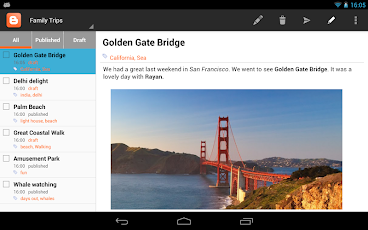
Are you a blogger who blog using Google blogger :D, then definitely you should have the app I am going to talk about. Google blogger android app is now available for bloggers in Play store . Google blogger android app is provided by Google and it is absolutely free

Features of blogger android app

Blogger android app download
  • Compose a post that you can save to draft or immediately publish
  • Edit existing posts 
  • View list of your saved and published posts
  • Switch account/blog if you have more than one
  • Embed an image from the gallery, or, by taking a picture directly from the app
  • Add labels to your posts
  • Add location information
How's the app do you like it, Tell us about it on your comments below


[Continue Reading]

Friday, 12 July 2013

Best android Action games / Shooter games of 2013

Hi friends, today I am going to tell you about some best android action / shooter games of 2013. The games I am going to introduce here are really awesome, enjoyable and worth to download. so let me start introducing
1. Frontline Commando

best android game 2013, top android action game 2013, top android shooter game 2013 See Frontline Commando on Google Play store

Frontline commando is an awesome shooter or action game developed by glu mobile. This game can be downloaded for free at Google play store . In this game you are the only remaining commander of a team which was attacked by enemies. So the player fight against enemies lonely. This game is entirely superb contains good moves, guns, graphics, musics etc

2. Modern Combat 4: Zero Hour
best android game 2013, top android action game 2013, top android shooter game 2013

See Modern Combat 4: Zero Hour on Google Play store

Modern Combat 4: Zero hour is a stunning action game by gameloft which can be called as the best action game of 2013.This game is worth buying. It have amazing graphics, music, guns and visuals.

These two games are android best shooter or actions games of 2013 according to my gaming experience . Download these games enjoy it.
[Continue Reading]
Powered By Blogger · Designed By Seo Blogger Templates